In this tutorial I will show you the basic preface of Krita
that includes how to start, the different toolbars and how to save afterwards.
So according to the Wikipedia, Krita is a free and open-source raster graphics
editor designed primarily for digital painting. It is available on Windows, MacOS, Linux, Android and Chrome OS. I am also a beginner so I will try my best to teach the
basics by showing you the use of some of the important tools in Krita to make
your own digital art, so lets start.
Click the program and start, then click New
File.
A window
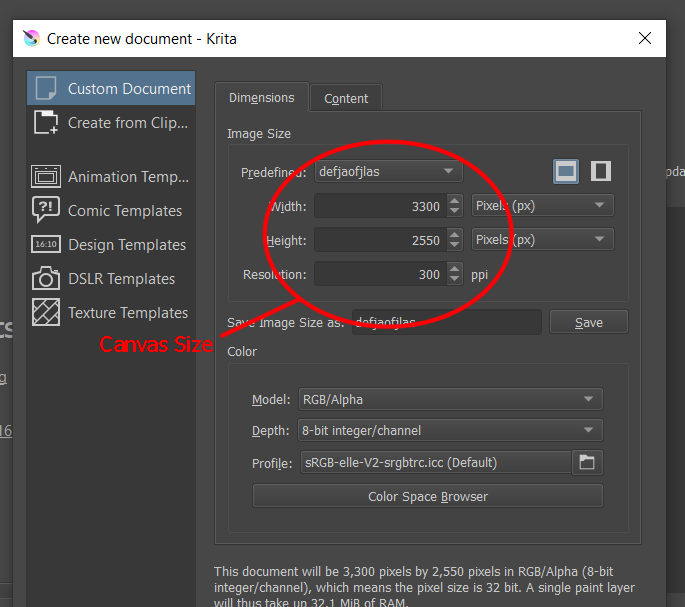
will open where you can choose your preferred size and other settings. For high quality art, I choose
3300 px for width, 2550 pixels for the height and 300 ppi for the resolution.
After that, the workspace area will appear. On the left side are the sidebars wherein you can choose different options that will be helpful for your art.
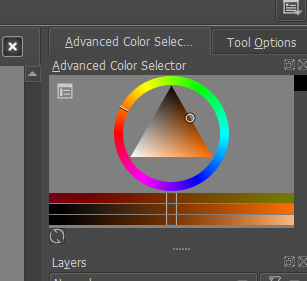
On the right side, the top part is the Color
Settings, under it is the Layers then below is the Brush Selections.
Above is the Toolbar wherein you can choose your
desired opacity each layer as well as the size of your brush.
Start by naming your layer for you to identify
which layer are you on.
Next, click the brush icon on the sidebar then choose your desired color and desired brush then start sketching. For this illustration I will be going to use the dry brush.
After that, proceed to draw your art, add the
colors and details.
After you finish your drawing, click File then
click Save As.
Lastly,
after clicking Save As, a window will open, locate your desired location of the
artwork, type your desired file name and save it as .png. That’s about it.
Watch the attached video file for demonstration.